CCTV Cam - Turn Any Old Android Phone Into a Local CCTV Camera
CCTV Cam turns any Android 6.0+ phone into a Wi-Fi CCTV camera — live MJPEG stream, MP4 recording, torch, camera switch and snapshots, all from your browser. No cloud, no subscription.
You probably have an old Android phone lying in a drawer. Cracked corner, weak battery, but the camera still works perfectly.
CCTV Cam turns that phone into a real CCTV camera. Install the app, tap START, and any browser on the same Wi-Fi can watch the live feed, record video, snap photos, toggle the flashlight, and switch cameras — no cloud account, no subscription, no data leaving your home.
Project link: mayur-454/cctv-cam on GitLab — MIT licensed, Kotlin + Jetpack Compose.
In short: one APK + one Wi-Fi network = instant IP camera. Phone runs a tiny web server on port 8080, you open
http://<phone-ip>:8080on your laptop, and you are watching.
What is CCTV Cam?
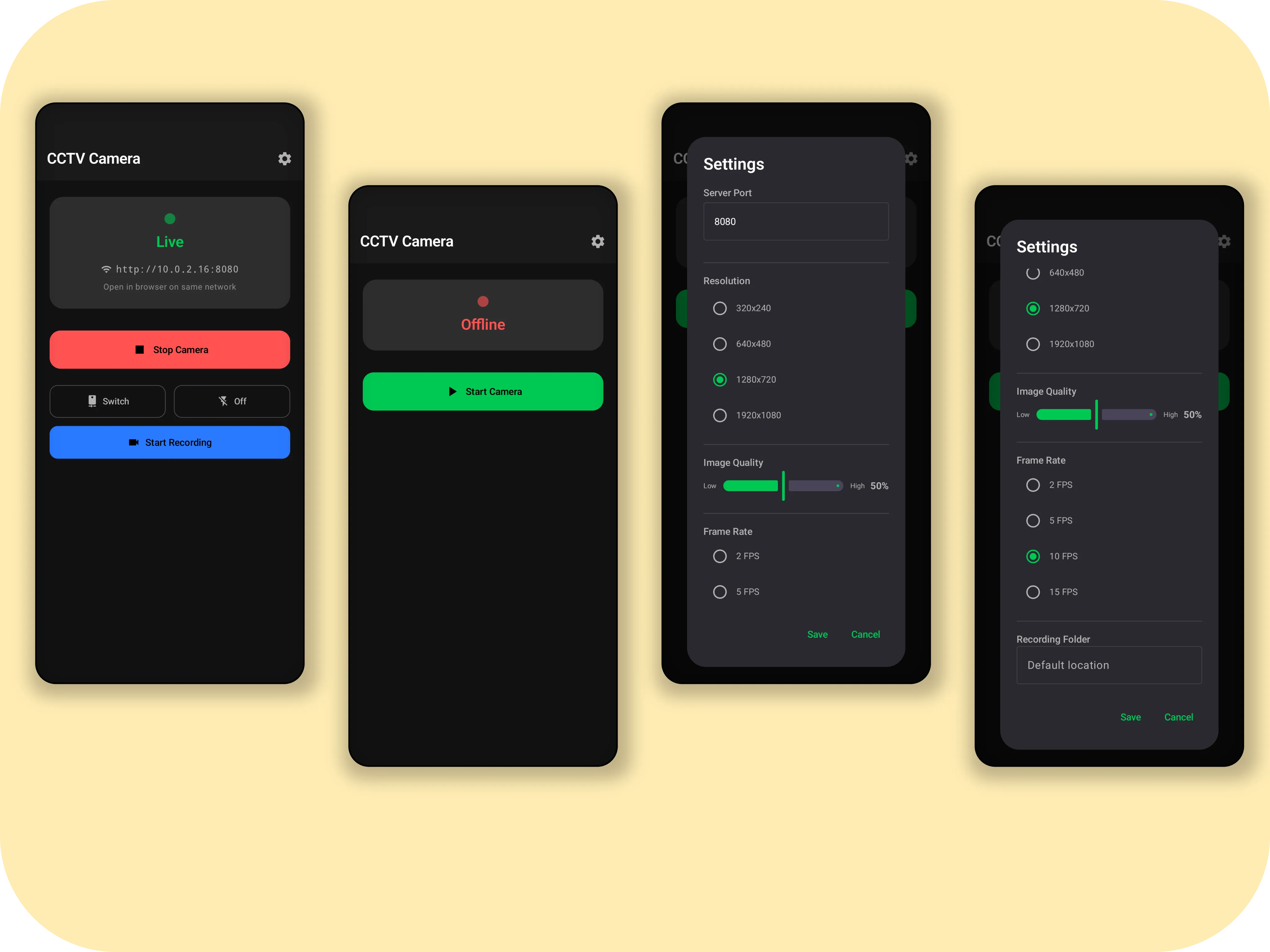
Think of it as a baby monitor / pet cam / door cam you already own:
- Phone side: opens the camera with the Camera2 API, runs a NanoHTTPD web server, and keeps itself awake with a foreground service.
- Viewer side: a single-page web UI (vanilla HTML/CSS/JS, no frameworks) with a full-viewport live feed and a slide-out control drawer.
- Connection: plain HTTP + MJPEG over your local Wi-Fi. Nothing is uploaded anywhere.
Phone (CCTVCam App)  --Wi-Fi-->  Any Browser
Camera2 API -> MJPEG -> Live Feed
NanoHTTPD :8080 <-> REST -> Controls / Recordings
No pairing codes. No QR dance. If you can type an IP address, you can use it.
Why I built it
New IP cameras are cheap, but they come with baggage: vendor clouds, monthly fees, apps that want your location, and streams that round-trip through someone else’s server.
I wanted the opposite:
- Reuse, don’t e-waste. Millions of perfectly good Android 6.0+ phones are retired every year. Their sensors beat most budget ESP32 cams.
- Local-first. The feed should never leave my network unless I decide it does.
- Hackable. A simple REST API means I can reuse the phone as eyes for other projects — like Spark, my AI companion robot , which uses a phone camera over Wi-Fi for face presence.
So CCTV Cam is deliberately boring in the best way: Kotlin, Camera2, tiny HTTP server, done.
What can it do?
| Feature | How you use it |
|---|---|
| 📡 Live MJPEG stream | Open http://<phone-ip>:8080 — works on phone, laptop, tablet, smart TV browser |
| 🎥 MP4 recording with audio | Hit Record in the web UI — saves H.264 + AAC .mp4 on the phone |
| 📷 Front / back switch | Toggle remotely from the browser, no touching the phone |
| 🔦 Torch control | Turn flashlight on/off from the web UI — /api/torch/on, /api/torch/off |
| 📸 Snapshots | Download a JPEG of the current frame on demand |
| 💾 Recordings browser | List and download saved .mp4 files from the web UI |
| 🌙 Dark / light theme | Web UI follows your OS prefers-color-scheme |
| ⚡ Background operation | Foreground service + Wi-Fi lock + wake lock — keeps streaming with screen off |
| 🔒 Fully offline | No Firebase, no analytics, no cloud. Same-network HTTP only |
From the Android app itself (Jetpack Compose + Material 3) you get START/STOP, live IP display, recording + torch status, and a settings dialog for port, resolution, and quality — all without touching a terminal.
Web UI tour
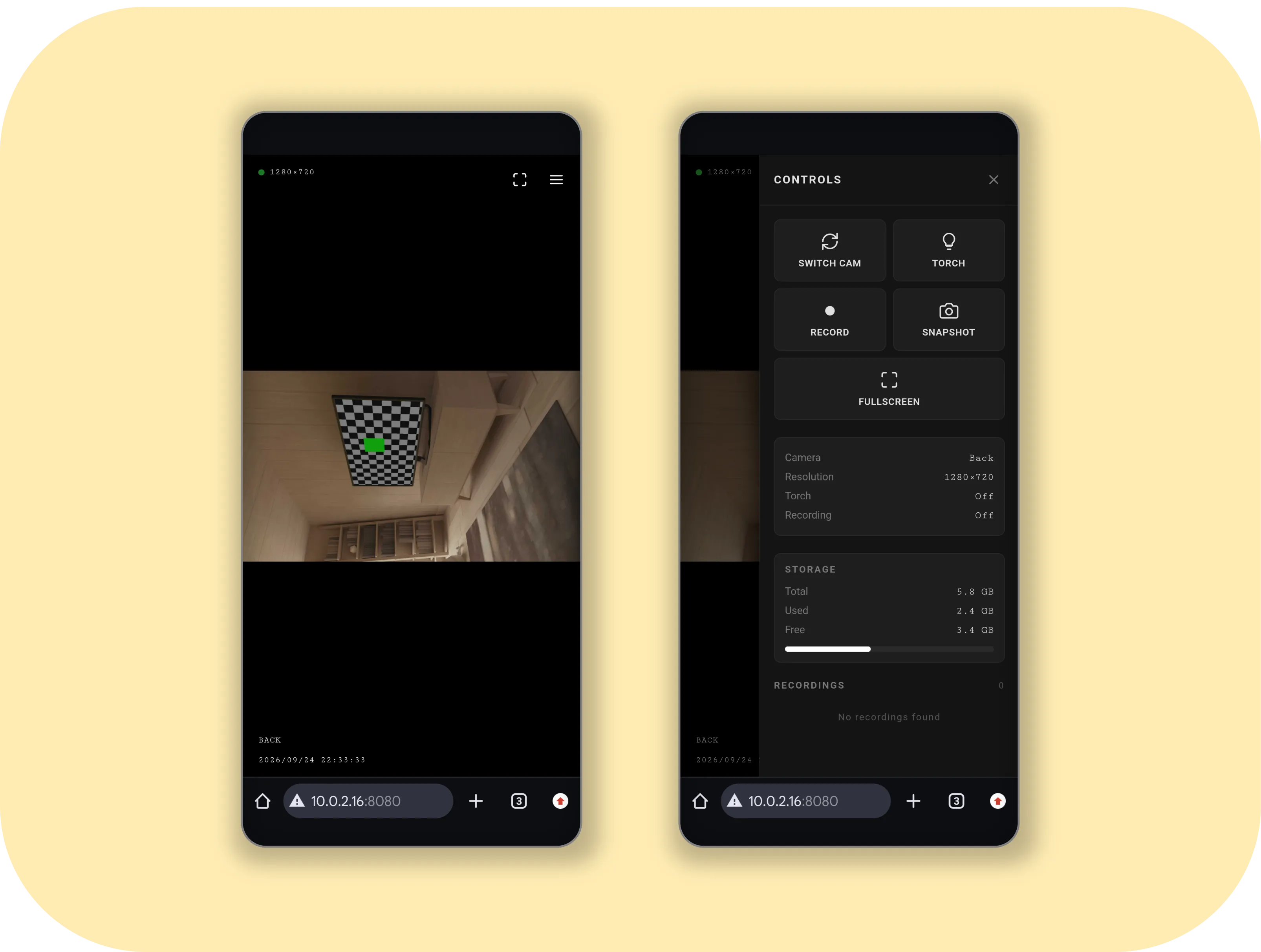
The web interface is a single index.html (~800 lines) served straight from app assets — no build step, no npm.
- Live Feed: full-viewport MJPEG
<img src="/video">with resolution OSD (e.g. 1280×720) - Side drawer: camera switch, torch toggle, record start/stop, snapshot, recordings list, fullscreen
- Responsive: usable on desktop and phone browsers, touch-friendly buttons
- Theme sync:
prefers-color-schememedia query, so it matches your laptop automatically
Because it’s just MJPEG + REST, you can also embed the feed anywhere — Home Assistant picture card, VLC (Open Network Stream), OBS Browser Source, or a <img> tag on your homelab dashboard.
Getting started in 5 minutes
You need: an Android phone (API 23 / Android 6.0+), Wi-Fi, and a second device with a browser on the same network.
1. Build the APK
git clone https://gitlab.com/mayur-454/cctv-cam.git
cd cctv-cam

./gradlew assembleDebug

# APK lands here:
# app/build/outputs/apk/debug/app-debug.apk
2. Install it
# Phone connected over USB with USB debugging on:
adb install app/build/outputs/apk/debug/app-debug.apk

# Or just copy the APK to the phone and tap to install
3. Run it
- Open CCTVCam on the phone
- Grant Camera, Microphone (for MP4 audio), and Notifications (for the foreground service)
- Tap START CAMERA
- Note the IP on screen, e.g.
192.168.1.105 - On your laptop browser, open:
http://192.168.1.105:8080
That’s it. Live video.
Tip: disable battery optimization for CCTVCam. Some OEMs (Xiaomi, Vivo, Samsung) aggressively kill background services. Lock the app in Recents and allow background activity, otherwise the stream will drop when the screen sleeps.
REST API — automate everything
The embedded NanoHTTPD server exposes a tiny REST API. This is what the web UI calls, and what you can call from scripts, Home Assistant, or another robot:
| Method | Endpoint | What it does |
|---|---|---|
| GET | / | Web UI |
| GET | /video | MJPEG live stream (multipart/x-mixed-replace) |
| GET | /api/status | {status, cameras, recording, torch, resolution} |
| GET | /api/switch | Toggle front/back camera |
| GET | /api/torch | Toggle torch |
| GET | /api/torch/on | Torch on |
| GET | /api/torch/off | Torch off |
| GET | /api/record/start | Start MP4 recording |
| GET | /api/record/stop | Stop recording |
| GET | /api/record/status | {status, recording} |
| GET | /api/snapshot | Current frame as JPEG |
| GET | /api/recordings | List saved MP4s {status, recordings[]} |
| GET | /recordings/<name> | Download MP4 |
Example:
# status
curl http://192.168.1.105:8080/api/status
# {"status":"ok","cameras":2,"recording":false,"torch":false,"resolution":{"width":1280,"height":720}}

# snap a photo from cron every minute
curl -s http://192.168.1.105:8080/api/snapshot -o cam-$(date +%H%M).jpg

# toggle torch
curl http://192.168.1.105:8080/api/torch/on
Because every action is a GET, you can trigger it from a browser bookmark, Node-RED, Tasker, or a single ESP32 HTTP call.
How it’s built
app/src/main/java/com/cctvcam/
├── MainActivity.kt   # Compose UI — permissions, service control, IP display, settings
├── CameraHelper.kt   # Camera2 wrapper — capture session, YUV→JPEG, MediaRecorder, torch/switch
├── WebServer.kt      # NanoHTTPD — MJPEG streaming, REST API, static index.html serving
├── CCTVService.kt    # Foreground service — lifecycle, Wi-Fi + wake locks, notification
├── AppSettings.kt    # Port / resolution / quality prefs
└── ui/theme/         # Material 3 theme
app/src/main/assets/
└── index.html        # Single-file web UI
CameraHelper(~823 lines): the hard part. Opens cameras via Camera2, creates capture sessions, converts YUV frames to JPEG for MJPEG, and drivesMediaRecorderfor H.264 + AAC recording.WebServer(~272 lines): NanoHTTPD 2.3.1. Servesindex.htmlfrom assets, streams MJPEG asmultipart/x-mixed-replace, handles the/api/*routes.CCTVService(~306 lines): foreground service so Android doesn’t kill the camera. HoldsWIFI_MODE_FULL+PARTIAL_WAKE_LOCK, posts a persistent notification (required on API 33+ / 34+ for camera foreground service type).MainActivity(~825 lines): pure Compose. Permission flow, animated START/STOP, live status cards, settings dialog — no XML layouts.
Tech stack
| Layer | Choice |
|---|---|
| Language | Kotlin |
| Android UI | Jetpack Compose + Material 3 |
| Web UI | Vanilla HTML/CSS/JS, single file |
| Camera | Android Camera2 API |
| Server | NanoHTTPD 2.3.1 (BSD-3) |
| Stream | MJPEG over HTTP |
| Recording | MediaRecorder (H.264 video + AAC audio in MP4) |
| Min SDK | 23 (Android 6.0 Marshmallow) |
| Target SDK | 36 |
Full dependency + license list is in DEPENDENCIES.md
— everything is Apache-2.0 / BSD-3 / EPL (tests only), MIT-compatible.
Permissions are minimal and purposeful: CAMERA, RECORD_AUDIO (MediaRecorder needs it even for video-only), INTERNET, WAKE_LOCK, FOREGROUND_SERVICE + FOREGROUND_SERVICE_CAMERA, POST_NOTIFICATIONS (API 33+), and WRITE_EXTERNAL_STORAGE only on API ≤28.
Privacy & security — read this
⚠️ CCTV Cam serves unencrypted HTTP on your LAN. Anyone on the same Wi-Fi who guesses
http://<phone-ip>:8080can watch.
That’s by design for simplicity, but follow these rules:
- Use it only on a trusted private Wi-Fi — home, lab, not café / hostel open Wi-Fi
- Never port-forward 8080 directly to the internet. Need remote access? Use Tailscale / WireGuard VPN into your home, then open the local IP.
- The app does not phone home — no analytics, no crash reporter, no external server. Verify it yourself: the only socket it opens is the local NanoHTTPD port.
If you need auth / HTTPS, that’s the natural next contribution — the WebServer.kt is small enough to add Basic Auth or a token query param in an evening.
What I actually use it for
- 3D-print monitor: old Redmi on a tripod pointing at the printer, laptop browser on the desk. Torch on = instant enclosure light.
- Pet / baby cam: phone on a shelf, tablet in the kitchen showing
/videofullscreen. - Door cam: phone taped to a window, snapshots via
curlin cron for a timelapse. - Robot eyes: Spark polls
/api/snapshotfor face presence — no extra camera module to buy. - Homelab dashboard: MJPEG
<img>tile next to qBittorrent, Proxmox, and Jellyfin stats.
Other ideas from readers: time-lapse a plant, watch a solder reflow from another room, keep an eye on a server rack’s blinking LEDs.
Troubleshooting (from the README)
| Symptom | Fix |
|---|---|
| Can’t connect from browser | Same Wi-Fi? No client isolation / guest network? Check IP changed after DHCP |
| Stream disconnects with screen off | Disable battery optimization, lock app in Recents, allow background activity |
| Camera error on open | Grant all permissions. Emulators usually lack cameras — use a physical phone |
| Recording fails | Grant Microphone permission — MediaRecorder requires it |
IP shows 0.0.0.0 | Not on Wi-Fi. Reconnect and restart service |
Try it, fork it
If you have that drawer phone, give it a second life:
- Clone:
git clone https://gitlab.com/mayur-454/cctv-cam.git - Build:
./gradlew assembleDebug - Install, tap START, open the IP in your browser
It’s MIT licensed — fork it, add auth, add motion detection, add WebRTC, use it in your own robot. PRs welcome:
git checkout -b feature/amazing-feature
# ... hack ...
git commit -m 'Add amazing feature'
git push origin feature/amazing-feature
And if you build something fun with the /api/snapshot or /video feed — a timelapse, a Home Assistant automation, a robot — tell me. That’s exactly why I open-sourced it: old phones deserve better than landfills.
Built with Kotlin + Camera2 + NanoHTTPD. Tested on physical devices, API 23+. No cloud was harmed in the making of this camera.