Spark - An AI Emotional Companion Robot on Arduino UNO Q
Meet Spark, a desk-sized AI emotional companion robot on Arduino UNO Q that sees, hears, feels touch, and expresses emotions with OLED eyes and servo ears.
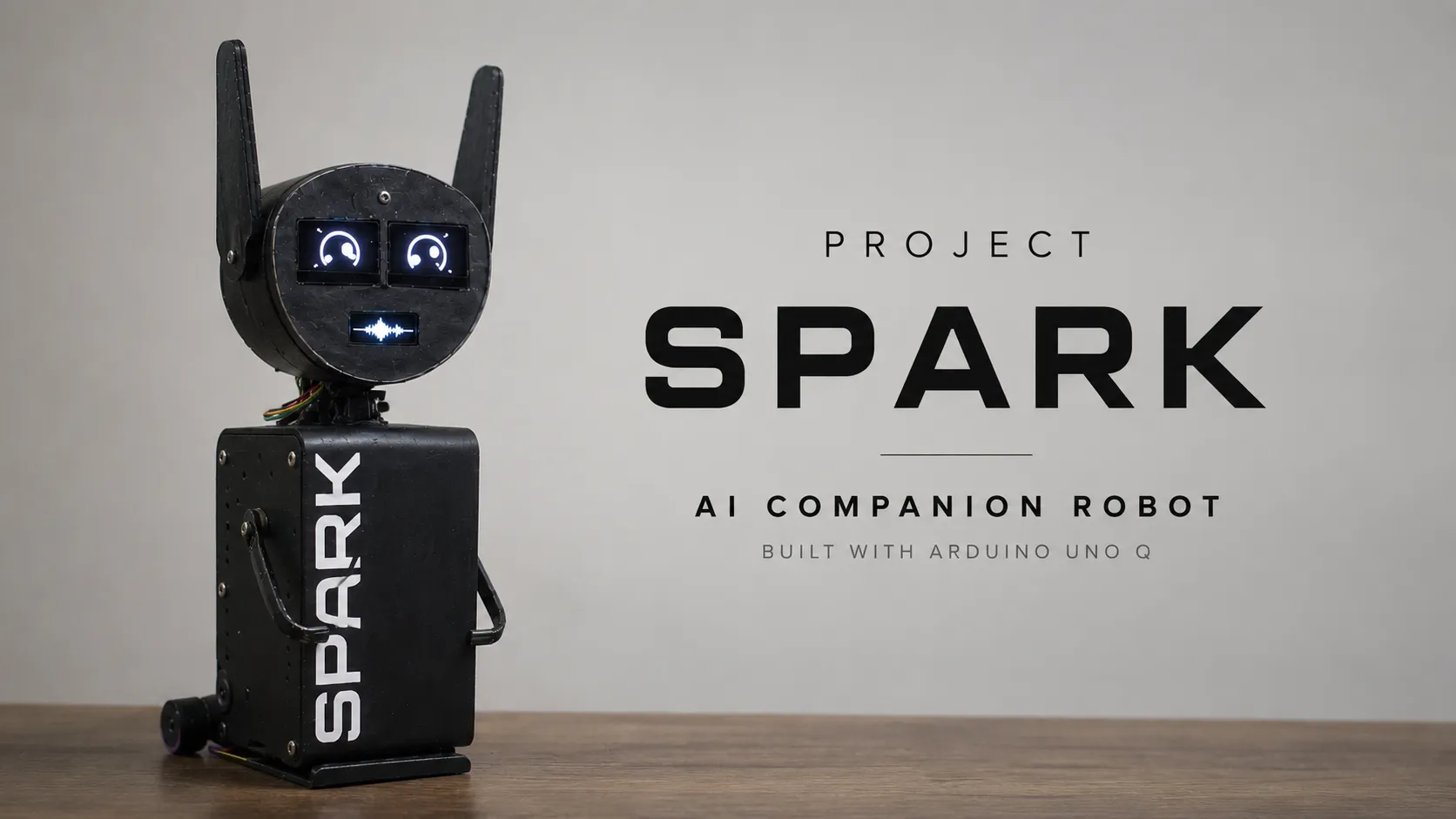
Meet Spark — a small desk robot that acts like a pet. Pet its head and its ears droop. Pick it up and it notices. Say “Hey Spark” and it listens, thinks, and talks back — with blinking OLED eyes, a little mouth that moves when it speaks, and a camera so it can see who is in the room.
In short: Spark is not a chatbot in a box. It has a body (sensors, eyes, ears) and a brain (AI that controls that body and even your smart home). Fast touch-and-feel reactions run locally with no internet, while smart conversation runs through an LLM.
Original project links:
- Hackster.io: Spark - An AI Emotional Companion Robot
- GitLab (code, PCBs, 3D files): mayur-454/project-spark
What is Spark?
Think of Spark as a pet for your desk:
- Ears that move — two small servos perk the ears up or let them droop, just like a cat or dog.
- Eyes that show feelings — two OLED screens animate happy, sad, angry, surprised, sleepy, and awake. They blink, glance around, and follow you a little.
- A mouth that “speaks” — a tiny OLED shows a waveform when Spark is talking, so you can see it speaking.
- A head you can pet — six touch sensors under the shell detect where you petted and how — a single stroke, repeated pets, or a long hold.
- A sense of being handled — a motion sensor inside knows if Spark is picked up, tilted, bumped, shaken, or dropped.
- Ears that listen — listens for “Hey Spark” and then listens to your question.
- Eyes that see — a phone camera over Wi-Fi lets Spark spot faces and look toward you.
- A brain that thinks — an AI assistant that can change Spark’s emotion, control smart-home devices, or take a photo to answer “what do you see?”
Instead of voice > AI > voice, Spark does:
human > sensors > AI > decision > physical reaction
That loop — Sense → Understand → Decide → Express — is what makes it feel alive.
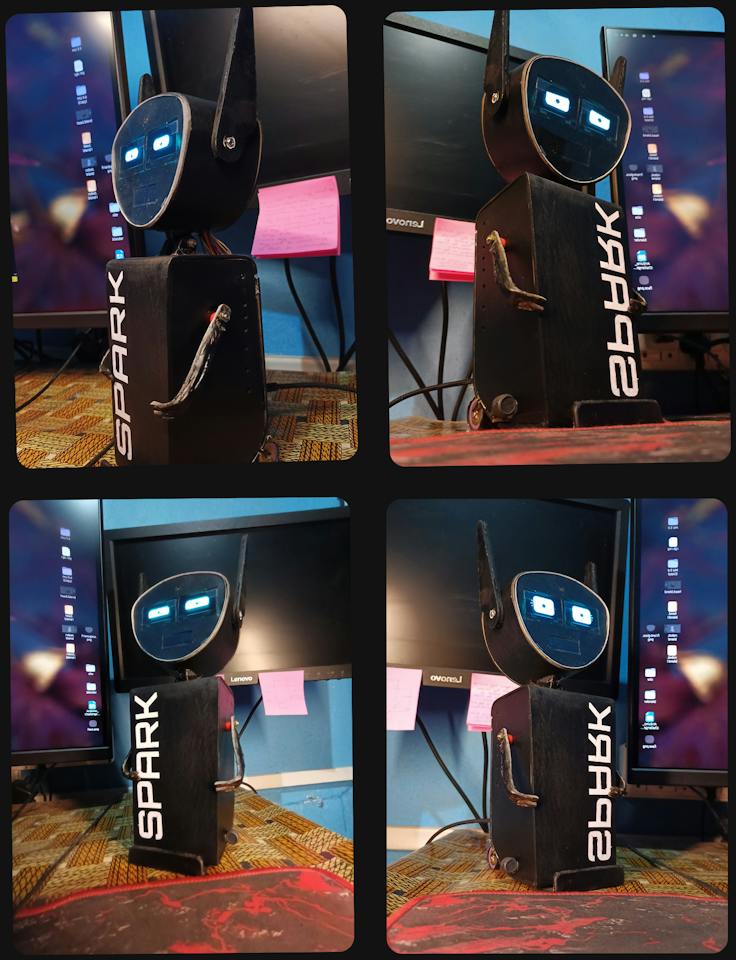
Note: because of a technical issue, the mouth OLED was not working at demo time. The eyes, touch, IMU, ears, and AI gateway were working.
What can Spark do?
| Capability | How it works | Status |
|---|---|---|
| Express emotion | Animated OLED eyes + ear positions + mouth animation. Emotions: neutral, happy, sad, angry, surprised, sleepy, wake/sleep | Working |
| Feel touch | 6-zone capacitive grid (TTP223) — single, repeated, long-hold pet patterns | Working |
| Sense handling | IMU (MPU-6500) detects pickup, put-down, tilt, bump, shake, drop, startle | Working |
| Hear “Hey Spark” | Wake-word brick → POST /wake → native audio/wake_listener.py | Experimental — bring-up validated, mic not fully tested |
| See people | Face-detection brick fed by phone camera over Wi-Fi (CCTV Cam App) | Experimental — bring-up validated |
| Think and act | LLM orchestrator with tools: set_emotion, Home Assistant, camera snapshot, multi-key failover | Working |
| Talk back | Speech-to-text + text-to-speech (scripts/audio/: Groq / whisper.cpp STT + Piper TTS) | Built — end-to-end wake → reply wiring is next |
Why I built Spark
I use AI assistants every day, but almost always through a screen, speaker, or cloud website. That made me ask:
What would an AI assistant feel like if it had a physical body? And who should own it?
Cloud AI is powerful because you don’t need expensive hardware. But it also creates dependence on one provider’s models, pricing, and servers.
So I set a rule for Spark early:
The robot should belong to the user, not to a particular AI service.
That means the owner can swap the AI model, speech system, and tools without rebuilding the robot. Use a local LLM via Ollama / LM Studio for privacy, or a cloud model via OpenRouter when you need more smarts. Same for STT/TTS.
Spark is my way to explore Physical AI — where AI senses the physical world, makes decisions, and expresses them through a body.
How Spark works: brain and body
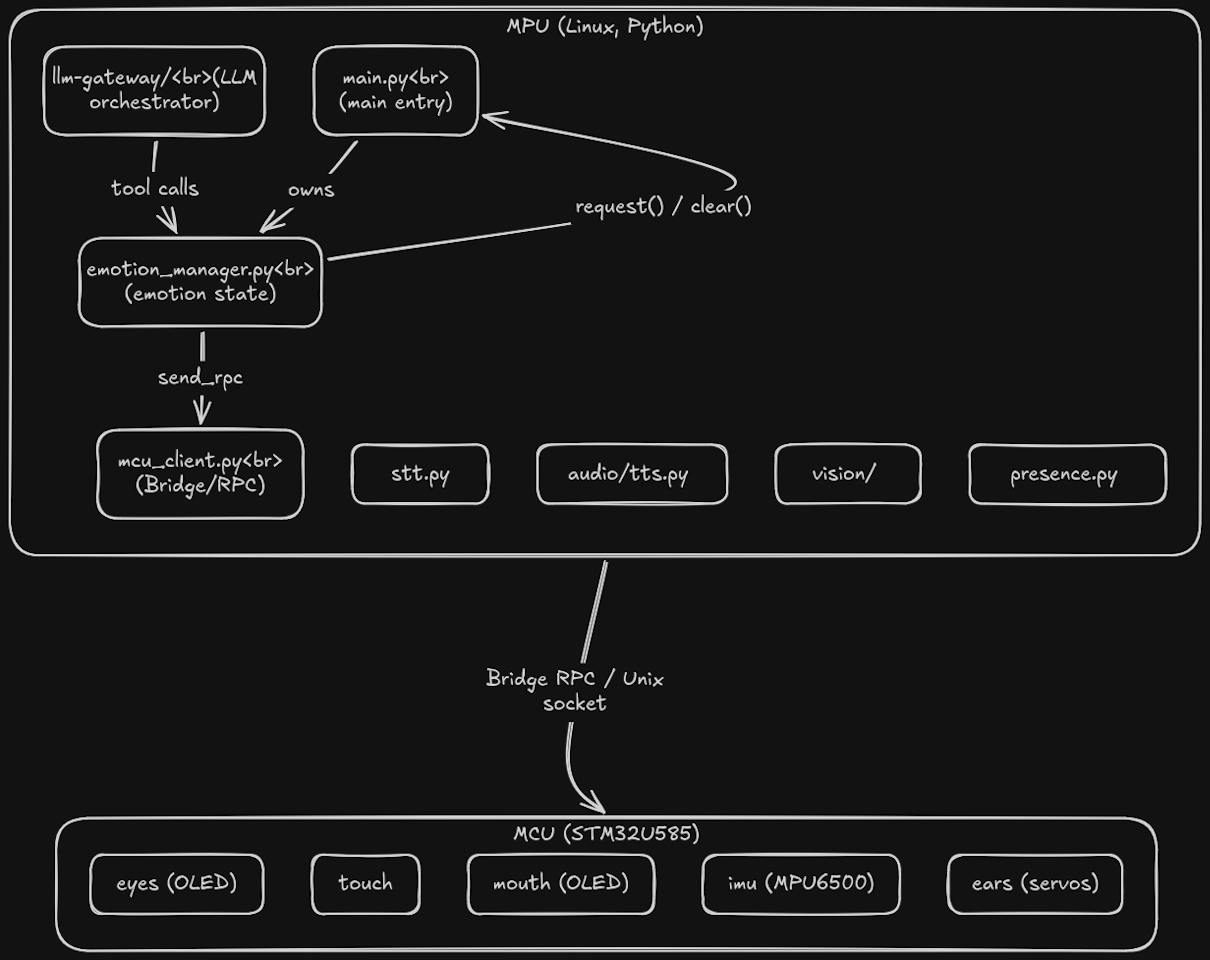
The most important design choice was splitting the system into two layers. The Arduino UNO Q is perfect for this because it has two processors on one board:
1. The Linux side — Spark’s “brain” (MPU)
A Qualcomm QCM2290 running Linux + Python. It handles everything that likes a full OS:
- Wake-word detection (“Hey Spark”)
- Speech-to-text (STT)
- LLM reasoning + tool calling
- Text-to-speech (TTS)
- Computer vision + face presence
- High-level robot behavior
- Home Assistant and other integrations
The AI layer is modular. The LLM gateway can route to different providers, automatically fails over to another API key on error, and exposes tools like set_emotion, home_assistant, camera snapshot, and an opt-in http_request tool.
2. The STM32 side — Spark’s “body” (MCU)
An STM32U585 microcontroller for predictable, real-time control:
- 2x 1.3" OLED eyes (SSD1106/SH1106, I2C, U8g2, addresses 0x3C & 0x3D)
- 0.91" OLED mouth waveform
- 6x TTP223 touch sensors + pet-pattern detection
- 2x SG92R ear servos (direct-drive)
- MPU-6500 IMU for pickup/tilt/bump/shake/drop
- LDR on A0 for auto OLED brightness (
mcu/ambient/) - PAM8403 audio amp + MAX9814 mic via USB sound card
The two sides talk over MessagePack RPC (Bridge RPC). The Linux side decides what Spark wants to do, the MCU makes the body do it reliably. The MCU also sends events up like TOUCH_EVENT or IMU_EVENT using the @EVT1| format.
Simple mental model:
"Hey Spark" → Brain (main.py) → RPC → MCU (eyes/ears/touch/IMU)
              Brain → STT/TTS
              Brain → LLM Gateway (tools)
              Brain → Vision loop (camera)
I also used Arduino App Lab for the camera + perception layer, and trained a custom Edge Impulse keyword-spotting model for “Hey Spark” so it feels natural — no button needed.
Making Spark expressive
A big part of the work was making Spark feel less like a box of electronics.

The emotion system has a central state. An AI reply, a touch, or an IMU event can request happy, sad, angry, etc., and that one state drives eyes + ears + mouth together consistently.
For example:
- Pet head gently → eyes happy + ears perk
- Long hold → eyes sleepy + ears droop
- Pick up suddenly → startle → eyes surprised + ears up
- AI says something friendly →
set_emotion(happy)tool call
The eyes blink, glance, and do a small gaze-follow. The ears add the physical “pet-like” cue that a screen alone can’t give.
Hardware at a glance (BOM)
| Part | What it is | Notes |
|---|---|---|
| Board | Arduino UNO Q 2GB — Qualcomm MPU + STM32 MCU | Two brains on one board |
| Eyes | 1.3" OLED x2, 128x64, I2C | U8g2 driver, 0x3C & 0x3D |
| Mouth | 0.91" OLED 128x32 | Waveform visualizer |
| Touch | 6x TTP223 capacitive | Head-top PCB carrier |
| Motion | MPU-6500 IMU | Pickup, tilt, bump, shake, drop |
| Ears | 2x TowerPro SG92R 180° servos | Direct-drive rotation |
| Camera | Old Android phone as IP camera (CCTV Cam App) over Wi-Fi | Face detection + AI snapshots |
| Audio | Electret mic (MAX9814) + 50mm woofer + PAM8403 amp via USB sound card | Wake + speech |
| Light | LDR on A0 | Auto-adjusts OLED brightness |
| Power | Custom dual-charger + boost power board + discrete MT3608 boost | 4x custom PCBs total |
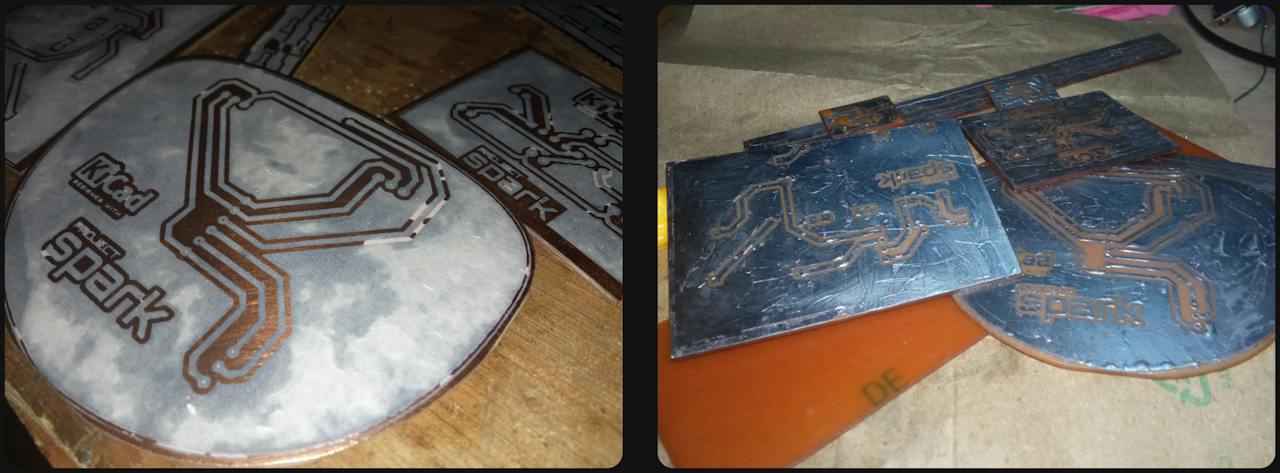
Custom PCBs in the repo (PCB/ — KiCad + Gerbers in GitLab, schematics in resources/schematic/):
heade-pcb/— head electronics carrier (eyes, mouth, LDR)head-top-pcb/— 6x TTP223 touch grid carrieramp_imu_pcb/— audio amp + MAX9814 mic + IMU carrierspark_power_board/+mt3608_boost_converter/— power
Don’t want to fab PCBs? You can build the same circuit on perfboard — the circuit is simple. See the schematic PDFs in the repo.
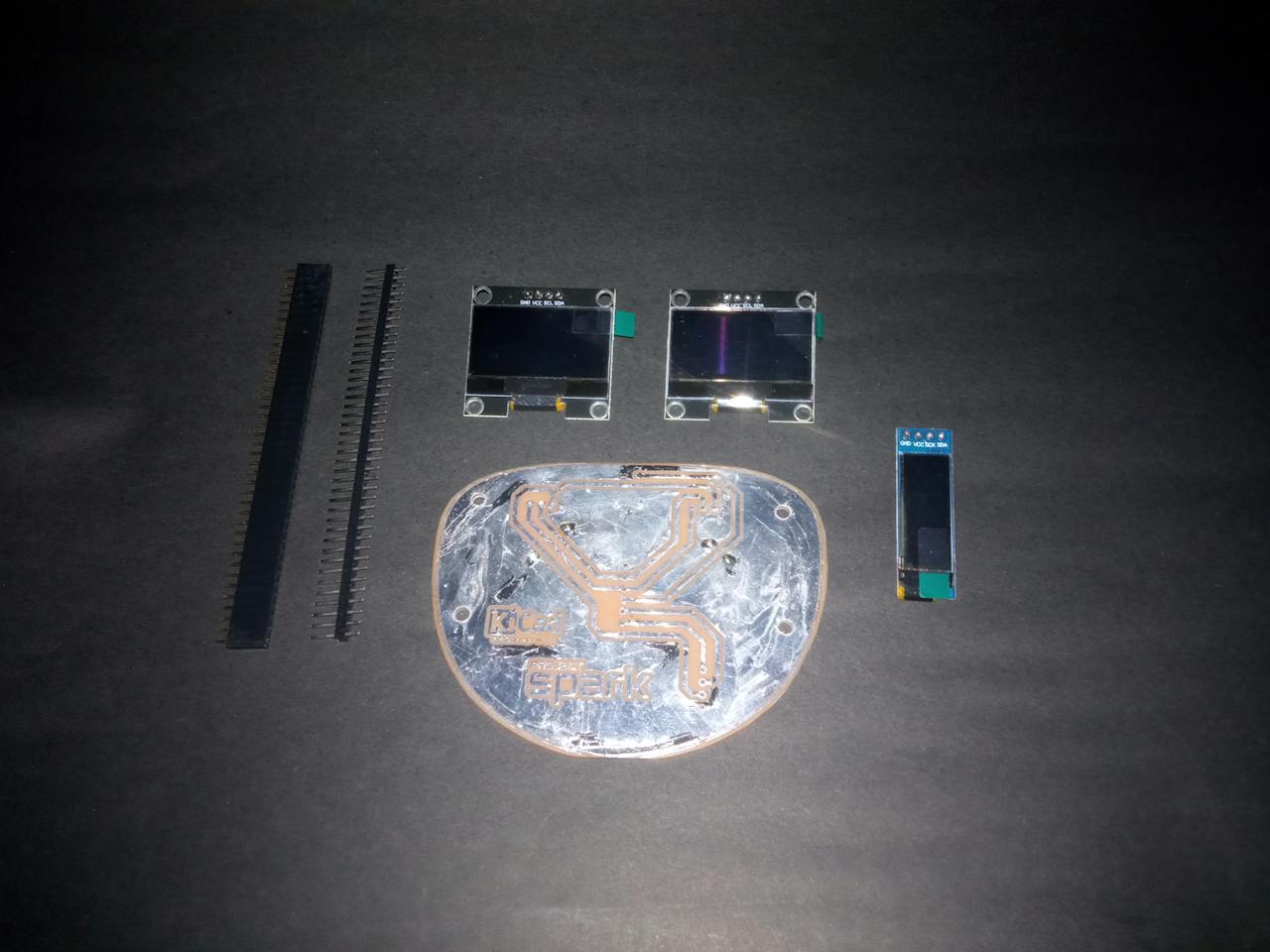
3D models are in Blender/ — body, ears, assembly, plus module models for the OLEDs and SG92R servos.
Software structure (from GitLab)
ProjectSpark/
├── Blender/               # 3D models (body, ears, assembly)
├── ki-cad-library/        # KiCad OLED symbols + footprints
├── PCB/                   # 5 KiCad boards (see above)
├── mcu/                   # STM32 firmware
│   ├── eyes/              # OLED eyes (eyes.ino + src/ + README)
│   ├── touch/             # TTP223 grid + pet patterns
│   ├── mouth/             # 0.91" mouth waveform
│   ├── ears/              # 2x SG92R servos
│   ├── imu/               # MPU-6500 events
│   └── robot/             # Main firmware: all modules + Bridge RPC
├── app-lab/projectspark/  # Experimental wake-word + face bricks
├── resources/images/ + schematic/
└── scripts/
    ├── main.py            # Brain/gateway orchestration
    ├── audio/             # wake_listener, VAD recorder, STT, TTS
    ├── vision/camera.py   # CCTVCam gateway
    ├── mcu_client.py      # Bridge RPC client + @EVT1| parser
    └── llm-gateway/       # Multi-provider LLM orchestrator
        ├── orchestrator.py, client.py, conversation.py
        └── tools/: emotion.py, home_assistant.py, curl.py, registry.py
Key ideas:
- Multi-key failover — add 3+ API keys, it switches automatically on timeout.
- Plugin tools — each tool is one file. Easy to add your own.
- Per-tool switches in
.env(TOOL_*_ENABLED). - Test mode + REPL — run the brain with fake hardware:
python main.py --test "hi"orpython main.pyfor interactive chat.
See scripts/README.md, scripts/audio/README.md, scripts/vision/README.md, and mcu/<module>/README.md in GitLab for full docs.
Building Spark on a ₹10,000 budget
I limited myself to about ₹10,000. I couldn’t buy a fancy 3D-printed body.
The quote for a 3D printed body was too high, so I reused what I had and built the current body from a reshaped old PVC pipe. Not perfect-looking, but it let me spend money where it mattered for the demo: UNO Q, sensors, displays, audio, and servos.
The result is deliberately a maker prototype, not a commercial product — and that’s the point. Spark shows what Physical AI can do with limited resources.
Challenges and lessons learned
Hardware integration is harder than modules. Each part worked alone. Together, displays + touch + audio + IMU + servos + USB sound + Wi-Fi camera needed a lot of debugging, especially USB/audio on Linux.
Two computers = one boundary to design carefully. MPU + MCU is powerful, but every interface is a possible failure point. I learned: modularity is good, but keep the RPC simple. Beginner traps I hit on UNO Q: never use
while(!Serial)in SBC mode (hangs with no USB host), App code can’t useSerial1(router owns it — useMonitor.println()on TCP 7500), and$/serial/opennotifications don’t forward — use--tcpmode for tests.Budget forces choices. I couldn’t buy my way out of problems. Enclosure, cable management, and extra sensors had to be balanced. Several ideas were postponed to get the core loop working: See / Hear > Understand > Respond > Express.
Scope management. The biggest lesson was learning when not to build. Each extra subsystem adds dev time and demo risk. I prioritized the core interaction loop first.
How to reproduce / try it yourself
Full code, Gerbers, and Blender files: GitLab repo .
Path A — Try Spark’s brain with no hardware (~5 min)
git clone https://gitlab.com/mayur-454/project-spark.git
cd ProjectSpark/scripts/llm-gateway
cp .env.example .env
# edit .env: set LLM_API_KEYS / LLM_BASE_URL / LLM_MODEL
pip install -r requirements.txt
python main.py --test "hi"
You should see a reply + simulated set_emotion(...) call. Then try python main.py for REPL (/reset, /raw).
Path B — Try the robot body (needs Arduino UNO Q)
# Test eyes first — most visual
arduino-cli compile -b arduino:zephyr:unoq mcu/eyes/
arduino-cli upload -b arduino:zephyr:unoq mcu/eyes/

# Full robot once modules work
arduino-cli compile -b arduino:zephyr:unoq mcu/robot/
arduino-cli upload -b arduino:zephyr:unoq mcu/robot/
Then on the board over SSH:
cd scripts/tests/mcu
pip install msgpack
python test_emotion.py happy
python test_emotion.py gaze left
python test_emotion.py demo
python test_imu.py --tcp
After flashing mcu/robot/, eyes + mouth start even without Python — that’s normal.
Path C — Voice + camera
cd scripts/audio
cp .env.example .env
pip install -r requirements.txt
python -m audio.wake_listener  # :8123, POST /wake to trigger
python -m audio.stt --check
python -m audio.tts --check
Camera is in scripts/vision/ (CCTVCam phone app on same Wi-Fi). See scripts/vision/README.md.
Path D — App Lab wake + face (experimental)
app-lab/projectspark/ runs keyword-spotting + face detection together. Change the phone IP and model path in .env, import into Arduino App Lab. You can use the default “Hey Arduino!” model if my custom “Hey Spark” Edge Impulse model isn’t public yet. Skip unless you need hands-free wake.
PCB + assembly
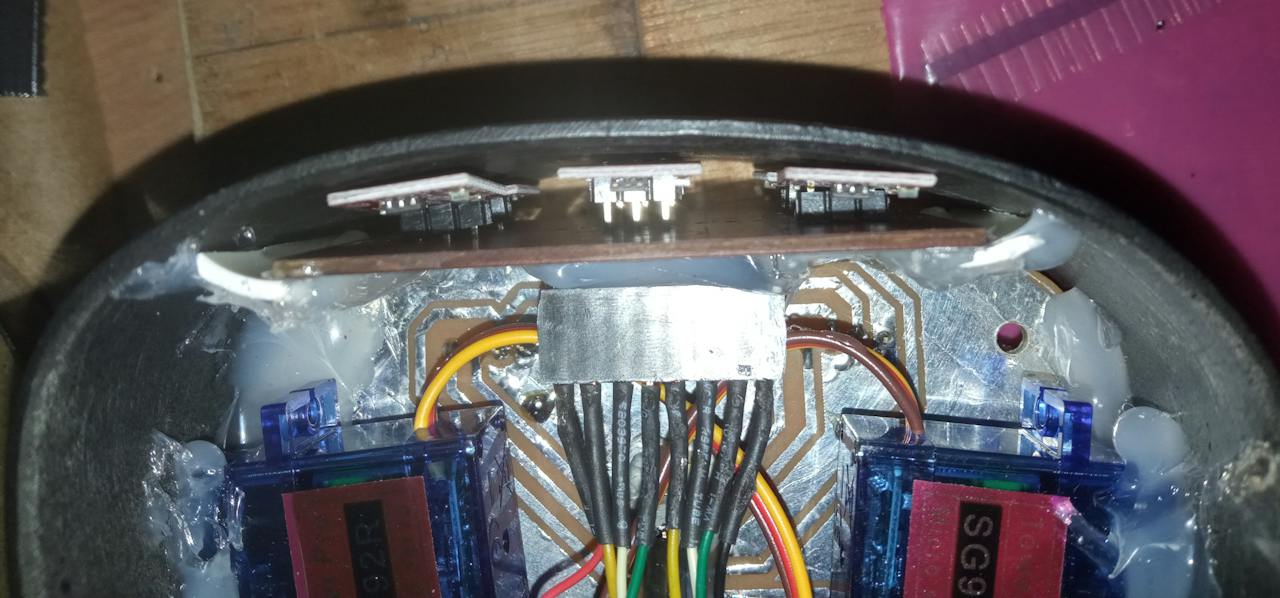
- Fab the 4 PCBs from Gerbers in GitLab, or etch at home (I did print-and-etch) or use perfboard.
- Assemble head PCBs, amp/IMU/mic PCB, and power board.
- Flash STM32, start App Lab app, then run
python3 main.py(or create a service to auto-start it). - Build the enclosure — 3D print from
Blender/files or hand-make like my PVC-pipe body. Use an old phone for the camera or add a camera module — your choice.
What I accomplished
The final prototype is a complete Physical AI architecture, not just one AI trick:
Arduino UNO Q + Linux AI + speech + vision + LLM tools + TTS + eyes + ears + touch + motion + audio.
Because it’s modular:
- New AI model ≠ rebuild robot
- New tool ≠ rewrite personality
- New sensor = add to physical layer
That extensibility is the most important outcome. Spark can already do Home Assistant. The same tool pattern could add smart-home control, personal automations, local info access, other robots/IoT, more sensors — as tools for the AI, not hard-coded behaviors.
Future improvements
- Cleaner, more durable enclosure + better cable management
- More expressive eye/ear animations + reliable touch behaviors
- Bigger tool ecosystem (more Home Assistant + local tools)
- More local AI, less cloud dependence where practical
- Web-UI for history and analytics
All incremental — the modular base already exists.
FAQ
Is Spark a finished product?
No. It’s an actively developed prototype. Software/hardware may change. Use the GitLab main commit referenced in the Hackster guide as the reproduction version.
How much did it cost? About ₹10,000 in parts, reusing materials and a PVC-pipe body to stay in budget.
Can I build it without custom PCBs? Yes. Use perfboard and the schematic PDFs. Custom PCBs just make it neater.
Do I need internet? Touch, eyes, ears, and IMU reactions run locally on the MCU with no internet. Conversation needs an LLM — local (Ollama/LM Studio) or cloud (OpenRouter etc.).
What board do I need? Arduino UNO Q (I used the 2GB version). The split MPU (Qualcomm Linux) + MCU (STM32) is core to the design.
Final thoughts
Spark started with a simple question: What would an AI assistant feel like if it had a physical body, and could its owner actually control it?
The answer is a budget-conscious, modular prototype that proves AI doesn’t have to live behind a screen or be locked to one cloud. It senses, reacts, expresses itself physically, and stays open enough to keep evolving.
If you build it, remix it, or improve the eyes/ears/touch — I’d love to hear about it. Start from the GitLab repo and the full Hackster.io build log .